
As of 29 October 2026 (12 Kartik 2083). Every service, fee and step below was read on Nepal Telecom’s own pages on this date: the Digital Services Portal at esim.ntc.net.np, its eSIM help centre and customer guide, the Postal SIM guide, the eSIM conversion page, the eKYC portal and the postpaid ownership transfer portal. The lost SIM fee is from Ratopati’s report of the service launch in July 2026.
esim.ntc.net.np is Nepal Telecom’s Digital Services Portal, and it now does far more than eSIM. From one page you can get a new prepaid eSIM, convert your physical SIM to eSIM, order a SIM by post, replace a lost or damaged SIM, update your KYC, transfer a postpaid number to someone else, and pre-register for a physical SIM.
Most of these used to need a queue at a Telecom office. This guide explains each service in plain language: what it does, what it costs, what you need and where the in-person step still applies.
All 7 services at a glance
| Service | What it does | Cost | Office visit needed? |
|---|---|---|---|
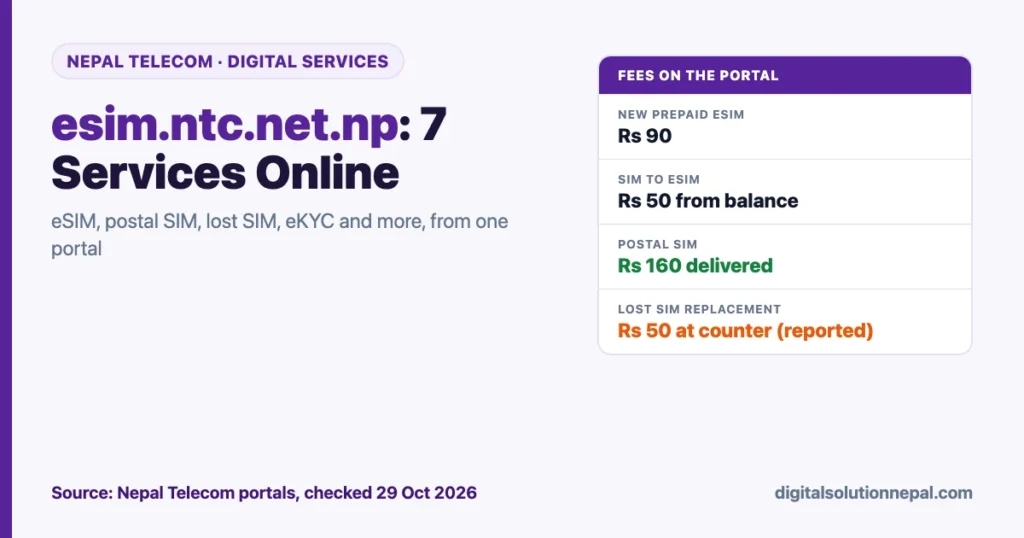
| Get New Prepaid eSIM | New Nepal Telecom number as an eSIM, choose your number | Rs 90 | No |
| Physical SIM to eSIM | Convert your existing number to eSIM | Rs 50, from main balance | No |
| NT Postal SIM | New prepaid physical SIM delivered by Nepal Post | Rs 160 (Rs 90 SIM + Rs 70 delivery) | No (unless delivery fails 3 times) |
| Lost / Damaged SIM | Apply online for a replacement SIM | Rs 50, paid at the counter (reported) | Yes, to collect |
| eKYC Portal for Prepaid | Complete or update KYC for a prepaid number | Not stated | No |
| Ownership Transfer for Postpaid | Move a postpaid number from one person to another | Not stated | Yes, counter verification |
| New Physical SIM Form | Register at home, then get the SIM at a shop or dealer with a QR code | Not stated | Yes, at a shop or dealer |
Help lines listed on the portal: 1498 for mobile (GSM) support and 198 for FTTH, both toll free.
1. Get a new prepaid eSIM (Rs 90)
This creates a brand-new Nepal Telecom number as an eSIM, so there is no plastic card. The portal lets you choose your preferred prepaid number from a list.
According to Nepal Telecom’s eSIM customer guide, the journey has seven steps on your dashboard:
- Request Sent: register with your email, fill in your KYC details and upload a clear colour photo of your citizenship or passport.
- Request Review: a Nepal Telecom administrator checks your details against your documents.
- Payment: pay the Rs 90 fee by Dynamic QR or NamastePay wallet.
- Confirm Profile: click “Confirm My Profile”.
- SIM Activate: click “Activate My eSIM”.
- SIM Download: download the eSIM QR code as a PDF from the dashboard; it is also emailed to you.
- Completed: scan the QR on your phone. iPhone: Settings > Cellular > Add eSIM > Use QR Code. Android: Settings > Connections > SIM Manager > Add eSIM > Scan QR code.
The help centre adds useful rules:
- Upload ID photos with the front and back combined, and take a photo while holding the ID you uploaded.
- If the OTP or QR email is missing, check the spam folder.
- Multi-eSIM: once one journey is complete, you can apply for another. The limit is set by the administrator, “usually up to 5”.
- Withheld: you get an email, fix the form and resubmit. Repeated withholds can permanently lock the profile.
- Rejected: you must visit a counter to get the eSIM.
- If you select a number and do not submit the form, the number is released for others after some time.
Our detailed Nepal Telecom eSIM guide covers phone compatibility and installation problems.
Need help with any Nepal Telecom online service?
Digital Solution helps you get an eSIM, convert your SIM, order a postal SIM, replace a lost SIM or fix your KYC on Nepal Telecom’s portal. Message us on WhatsApp.
2. Convert your physical SIM to eSIM (Rs 50)
If you already have a Nepal Telecom number and a phone that supports eSIM, you can move that same number to eSIM. The conversion page lists these conditions:
- Your phone must support eSIM. Check before applying.
- You need a minimum main balance of Rs 50. Rs 50 is charged for the eSIM change.
- You verify your mobile number with an OTP and a captcha.
- Connect to Wi-Fi to activate and download the eSIM.
- If the eSIM does not work, visit the nearest Nepal Telecom counter.
Once the eSIM is active, your old physical SIM stops working, so do this when you have time to install it straight away.
3. NT Postal SIM: a new SIM by post (Rs 160)
For people who want a physical card, the Postal SIM service delivers a new prepaid SIM through Nepal Post. The total is Rs 160: Rs 90 for the SIM and Rs 70 for delivery. You apply online, upload your citizenship or passport and a photo, pay by Dynamic QR or Namaste Pay, get your number and an activation code by SMS and email, track the parcel and activate with *1414#.
Nepal Post tries delivery up to three times. After that you collect the SIM from the Nepal Telecom counter you chose. Our step-by-step NTC postal SIM guide shows every screen and status.
4. Lost or damaged SIM replacement
If your SIM is lost or damaged, you can apply for a replacement online and then collect it. Nepal Telecom launched this service in July 2026. As Ratopati reported at the launch, the replacement fee is Rs 50, paid at the counter when you collect, and a representative can collect on your behalf.
The online form asks for security details to prove the number is yours. Our online SIM replacement guide explains each field, including the recently called numbers that many people struggle with. If your phone was stolen, also see how to block a lost phone and SIM.
5. eKYC portal for prepaid numbers
The eKYC Portal (kyc.ntc.net.np) lets prepaid users complete or update the KYC (Know Your Customer) details registered against their number. You log in with your 10-digit Nepal Telecom number and an OTP. The portal says to wait at least one day for your request to be reviewed after submitting.
Keeping KYC correct matters: it proves the number is yours if you ever need a replacement, an ownership change or help with fraud. Our Nepal Telecom KYC update guide walks through it.
6. Postpaid ownership transfer
The Postpaid Ownership Transfer Portal moves a postpaid number from the current owner to a new owner. According to the portal, it works in four steps:
- Verify identity: log in with the number being transferred and an OTP.
- Owner details: the current owner’s name, citizenship details, a secondary contact, and the signed consent letter (मन्जुरीनामा, manjurinama).
- Acquirer details: the new owner’s customer ID, mobile number, recently called contacts and a live webcam photo.
- Counter verification: visit a Nepal Telecom counter with original ID, or send a verified representative using a secondary OTP.
The portal’s FAQ is clear that a counter visit is mandatory after the online application. The online part saves paperwork and time at the counter, not the visit itself.
7. New physical SIM form
The last option lets you register for a new physical SIM from home. After you register, you take the QR code to the nearest shop or dealer that sells Nepal Telecom SIMs and collect the SIM there. This suits people near a dealer who want to skip filling forms at the shop.
Which service should you use?
| Your situation | Best option |
|---|---|
| New number, phone supports eSIM | New prepaid eSIM (Rs 90) |
| New number, want a physical card at home | Postal SIM (Rs 160) |
| New number, a dealer is nearby | New Physical SIM Form |
| Same number, new eSIM phone | Physical SIM to eSIM (Rs 50) |
| SIM lost or broken | Lost / Damaged SIM |
| KYC details wrong or missing | eKYC Portal |
| Giving a postpaid number to someone | Ownership Transfer |
Tips that avoid rejection
- Clear, uncropped ID photos are the number one reason for delays on every service.
- Use an email you can open. OTPs, QR codes and activation codes are sent there; check spam.
- Keep your Nepal Telecom number active and charged for OTPs, and keep Rs 50 balance for eSIM conversion.
- Use Wi-Fi when downloading or installing an eSIM.
- Do not share OTPs with anyone who calls you about “SIM upgrades”. Nepal Telecom’s portal is the only place to type them.
Frequently asked questions
What can I do on esim.ntc.net.np?
Seven things: get a new prepaid eSIM, convert a physical SIM to eSIM, order a SIM by post, replace a lost or damaged SIM, update prepaid KYC, transfer postpaid ownership, and pre-register for a new physical SIM.
How much does a new NTC eSIM cost online?
Rs 90, paid by Dynamic QR or NamastePay wallet after your request is approved, according to Nepal Telecom’s eSIM help centre.
How much does it cost to convert an NTC SIM to eSIM?
Rs 50, deducted from your main balance. You need at least Rs 50 balance before you apply.
How many eSIMs can I get on the portal?
The portal supports Multi-eSIM. The administrator sets the limit, which Nepal Telecom says is usually up to five.
Do I still need to visit a Telecom office?
Not for a new eSIM, an eSIM conversion or a postal SIM. You still visit a counter to collect a replacement for a lost SIM, to complete a postpaid ownership transfer, or if your eSIM request is rejected.
Conclusion
esim.ntc.net.np has become Nepal Telecom’s main self-service door: new eSIM for Rs 90, eSIM conversion for Rs 50, postal SIM for Rs 160, lost SIM replacement, eKYC, postpaid ownership transfer and a new SIM form. Prepare clear ID photos and an email you can open, and most of these can be done from your phone.
Need help choosing a service, uploading documents or installing an eSIM? Digital Solution can help you complete it in one go.
Sources
- Nepal Telecom Digital Services Portal (checked 29 October 2026)
- Nepal Telecom eSIM Help Center
- Nepal Telecom eSIM customer guide
- Nepal Telecom eSIM conversion portal
- Nepal Telecom Postal SIM customer guide
- Nepal Telecom: NT Postal Online SIM Service
- NT eKYC Portal
- NT Postpaid Ownership Transfer Portal
- Ratopati: Lost or damaged Nepal Telecom SIM, fill the online form from home
Fees and steps can change. Check the amount shown on the portal before you pay.

Rabin Paudel
Rabin Paudel is the Founder of Digital Solution, a Content Creator, and an AI Trainer. He shares practical and easy-to-understand content on Artificial Intelligence, Digital Literacy, Online Services, FinTech, and Technology. His mission is to make technology simple, accessible, and useful for everyone.
View all posts by Rabin Paudel →