As of 24 October 2026 (7 Kartik 2083). Checked against eSewa’s own blog pages on KYC, KYC rejection, NID verification, account blocks, minor accounts and transaction limits (blog.esewa.com.np), Khalti’s published transaction limit page for a second reading of the same NRB rules, and ShareSansar reports on Nepal Rastra Bank circulars. The NRB website (nrb.org.np) could not be reached on the check date, so the directive text itself was not read; figures below are as eSewa publishes them.
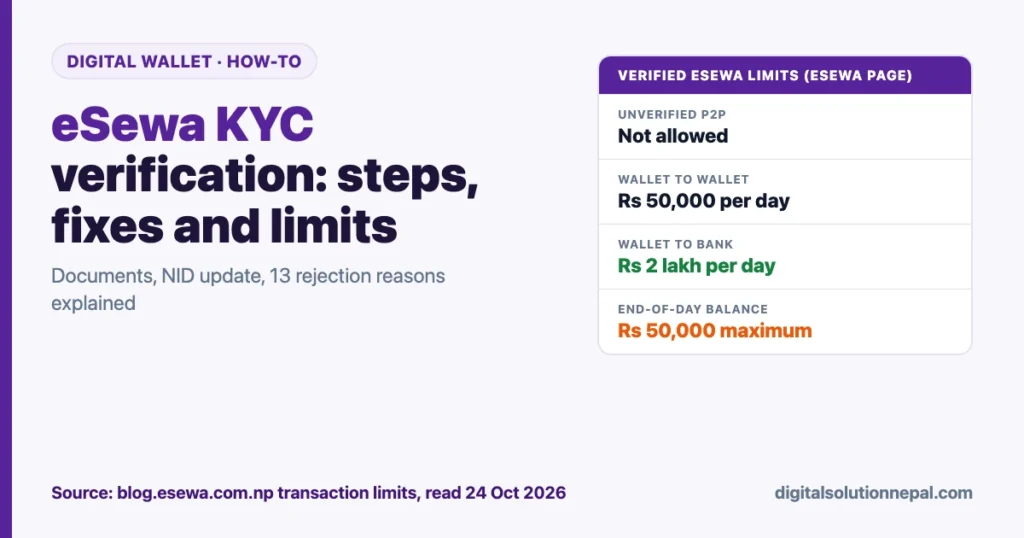
eSewa KYC verification is the step that turns a basic eSewa ID into a full wallet. Without it, eSewa’s own limits page shows zero for sending money to another wallet and no withdrawals to a bank. With it, you can send up to Rs 50,000 a day to other wallets and move up to Rs 2 lakh a day to your bank account.
The process takes a few minutes in the app, but a lot of submissions bounce back because of a blurred photo, a one-sided document or a spelling mismatch. This guide covers what to upload, the exact steps, the new National ID (NID) update, every rejection reason eSewa lists with a fix, and the verified versus unverified limits.
Quick answers
| Question | Answer |
|---|---|
| Is KYC free? | Yes. eSewa says no charge is involved for filling KYC |
| Documents accepted | Citizenship, driving licence, passport, voter ID or National ID card, plus a live photo |
| How long verification takes | eSewa’s posts say 24 to 72 hours, with a notification when done |
| How to check status | A green “Verified” tick under your profile photo |
| Can unverified users send money to another wallet? | No. eSewa lists 0 for unverified wallet-to-wallet sending and receiving |
| Maximum end-of-day balance | Rs 50,000 (eSewa and Khalti both publish this figure) |
| Wallet-to-wallet (verified) | Rs 25,000 per transaction, Rs 50,000 per day, Rs 5 lakh per month |
| Wallet-to-bank (verified) | Rs 50,000 per transaction, Rs 2 lakh per day, Rs 10 lakh per month |
| Can one person verify two eSewa IDs? | No. One KYC per person; reused documents are rejected |
| Where to see your own limits | Profile, then “My Limit” in the app |
Why eSewa KYC verification matters more in 2083
KYC (Know Your Customer) is required by Nepal Rastra Bank for every licensed wallet. Older eSewa posts describe KYC as needed for transactions above Rs 2,500. Khalti’s current limits page goes further and says a user must be KYC verified before initiating any transaction. Our reading: treat KYC as required for any real use of a wallet.
Since mid-2026 there is a second layer. NRB amended its payment directive so that wallets must collect National ID details or a self-declaration from existing users, with an Asoj 2083 deadline. We explained that rule in our post on NRB’s National ID rule for digital wallets. On 13 October 2026 eSewa published its own NID verification steps, which are included below.
So in practice there are now two checks: the original KYC form (personal details, document, photo) and the NID update.
Documents and details you need
Have these ready before you open the app. Taking clear photos first saves most rejections.
| Item | What eSewa asks for | Practical tip |
|---|---|---|
| Identity document | One original government ID: citizenship, driving licence, passport, voter ID or National ID card | Use the original card, not a photocopy or a photo of a photocopy |
| Both sides | Front and back for citizenship and passport | eSewa’s 2023 post says voter ID and licence backs may not be needed; upload both anyway if the app asks |
| Live photo | Front-facing photo taken in the app camera | No cap, mask, scarf, helmet or sunglasses; both ears visible; no filters |
| Personal details | Full name, father’s name, grandfather’s name, date of birth, gender, contact number, occupation, permanent and current address | Copy spellings exactly as printed on the document |
| Document number | As printed on the ID | One wrong digit is a listed rejection reason |
| NID number (new) | National ID number, or the card itself for scanning | If you have not received it, submit the self-declaration |
Expired licences or passports are rejected, so if your licence has expired, use your citizenship instead.
Step-by-step eSewa KYC verification in the app
eSewa has changed menu names over the years. Its 2024 post gives this order, which matches the current app layout described in its blog:
- Log in to the eSewa app with your eSewa ID (mobile number) and password.
- Tap your profile picture.
- Tap My Information.
- Select Continue to open the KYC form.
- Fill in personal details exactly as on your document: names, date of birth, gender, occupation and both addresses.
- Choose the document type and enter the document number.
- Upload clear photos of the front and back of the document.
- Take the live photo when the app opens the camera. Face the camera directly in good light.
- Review everything, tap Submit, then confirm with Yes.
- Wait for the notification. eSewa’s posts give 24 to 72 hours. When approved, a green “Verified” tick appears under your profile photo.
If the app shows a rejection, it usually tells you which part failed. Fix only that part and resubmit through the same My Information screen.
NID verification (the 2026 update)
eSewa’s post of 13 October 2026 sets out three paths, all under More, then NID Verification:
- You have the physical NID card: choose “I Have My NID Details”, tap Start Scanning, scan front and back, fill the remaining fields, review and submit.
- You have the NID number but not the card: choose “I Have My NID Details”, tap Enter Details Manually, type the details exactly as in the official NID record, review and submit.
- You do not have NID details yet: tap “No, I don’t have one yet”, read the declaration, tick the box and submit the self-declaration.
eSewa states that a self-declaration does not replace the requirement. You still need to add your NID details once you receive them. If your NID is already verified, you only need to act if the app asks.
Verified vs unverified eSewa limits
These are the figures on eSewa’s “Revision in Transaction Limits” page as read on 24 October 2026. Only figures that eSewa publishes are included.
| Transaction | Unverified | Verified |
|---|---|---|
| Wallet-to-wallet send | Not allowed (0) | Rs 25,000 per txn, Rs 50,000 per day, 10 per day, Rs 5 lakh and 100 per month |
| Wallet-to-wallet receive | Not allowed (0) | Rs 25,000 per txn, Rs 50,000 per day, 10 per day, Rs 5 lakh and 300 per month |
| Wallet-to-bank withdrawal | Not allowed | Rs 50,000 per txn, Rs 2 lakh per day, 10 per day, Rs 10 lakh and 50 per month |
| Cash in at eSewa agents | Not published | Rs 10,000 per txn, Rs 25,000 per day, Rs 1 lakh per month |
| Linked bank account payments | Needs a KYC-verified account | Rs 50,000 per txn, Rs 1 lakh or 10 times per day, Rs 10 lakh or 100 times per month |
| Merchant payments | Not published | Up to the amount billed by the merchant |
| End-of-day wallet balance | Not published | Rs 50,000 |
Monthly limits follow the English calendar month, according to eSewa.
Three things on that page that do not add up
We found inconsistencies on eSewa’s limits page, so read it carefully:
- The page is dated 3 July 2025 but says the limits follow NRB Payment System Directive 5/075 “dated 19th Bhadra, 2083”, which is September 2026. Our reading: the page was edited in place and the header date was not changed.
- Section A gives a maximum end-of-day balance of Rs 50,000, while section G lists a wallet balance of Rs 500,000 for verified users. Khalti’s page also gives Rs 50,000 as the overnight cap, so we use Rs 50,000. Spend or move anything above that before the day ends.
- The withdrawal section carries a note that it applies “from 5th September, 2024”. The daily and monthly figures (Rs 2 lakh and Rs 10 lakh) match the wallet-to-bank cap that ShareSansar reported NRB kept in its Unified Payment System Directive, 2082 (17 April 2026).
The reliable way to see your own current limits is in the app: tap your profile, then My Limit. It shows what you can hold, send and transfer, and what you have already used this day and month.
Festival relaxation on deposit count
ShareSansar reported on 16 October 2026 that NRB temporarily raised the number of deposits a person’s wallet can receive per day from 10 to 50 during Dashain (Ashwin 31 to Kartik 8, 2083) and Tihar and Chhath (Kartik 21 to Kartik 29, 2083). By our calculation, the second window runs from about 7 to 15 November 2026. This changes the count only; the rupee limits stay the same.
eSewa KYC rejected? 13 reasons and how to fix each
eSewa publishes 13 common rejection reasons. Here they are with the fix that works.
| Rejection reason | What went wrong | Fix |
|---|---|---|
| Informal photo | Filter, cap, hat or edited selfie | Retake in the app camera, plain face, no filters |
| Unclear photo | Face dark, blurred or cut off | Face a window or light, hold the phone at eye level |
| Photo taken from a photo | You photographed a printed photo or a screen | Only a live photo of you is accepted |
| Photo not uploaded | Skipped the live photo step | Resubmit and complete the camera step |
| Photo mismatch | Your face does not match the document photo | Use the most recent ID, for example NID or passport, if your citizenship photo is very old |
| Information mismatch | Name, date of birth or address differs from the document | Type spellings exactly as printed, including middle names |
| Document number mismatch | A digit missing or swapped | Copy the number slowly and check it twice |
| One-sided document | Only the front uploaded | Upload front and back |
| Document not uploaded | Missing image | Upload every requested side |
| Unclear document | Blurred, black-and-white or glare | Flat surface, good light, no flash glare, all corners visible |
| Duplicate or edited document | Photocopy or edited image | Photograph the original card |
| Expired document | Licence or passport past its expiry | Use citizenship or NID instead |
| Multiple eSewa IDs or reused documents | The same document already verifies another eSewa ID | Keep one ID; see the next section |
If you already have an old verified eSewa ID
NRB rules allow one KYC per person. If you created a new ID because you lost the SIM behind your old one, eSewa’s 2023 post says the new KYC will be rejected. The route it gives is to close the old account by contacting eSewa support or emailing csd@esewa.com.np with your documents, both the old and new eSewa IDs, and a live photo.
eSewa account blocked after KYC issues
eSewa’s 2024 post on blocked IDs lists failing KYC as the first reason. The others are fraud complaints, illegal activity such as betting or forex, crossing the balance threshold, breach of terms, police or court orders, repeated wrong login attempts and complaints between users.
To unblock, eSewa lists a handwritten signed letter, a live photo holding a government-issued document, and source of income and proof of residence. Blocks requested by law enforcement are lifted only after clearance from that body.
The quickest prevention is the same as for KYC: one ID, accurate details, and never sharing your password or MPIN. Our OTP, PIN and password safety guide explains why no genuine eSewa staff member will ask for them.
Under 18? Guardian consent
eSewa now requires parental or guardian consent for users under 18. The child sends a request from the Parent Consent option with the parent’s full name, KYC-verified eSewa ID and relationship. The parent reviews and accepts it in their own app, and eSewa verifies it before restrictions are lifted. The parent must have an active, KYC-verified eSewa wallet. Court- or government-appointed guardians may be asked for supporting papers.
A short pre-submission checklist
- Original ID in hand, not expired
- Both sides photographed flat, in daylight, all corners visible
- Spellings copied exactly from the ID
- Document number checked twice
- Live photo without cap, mask or glasses, both ears visible
- Only one eSewa ID in your name
- NID number ready, or the self-declaration done
Once verified, you can also use the same wallet to scan Khalti or bank QR codes; see our note on Khalti and eSewa QR interoperability.
KYC rejected again? Get your wallet verified right
Digital Solution in Pokhara helps you prepare clear documents, fix rejected eSewa or Khalti KYC and complete the NID update in one visit. हामी तपाईंलाई सहयोग गर्छौं।
Frequently asked questions
How long does eSewa KYC verification take?
eSewa’s own posts say 24 to 72 hours after you submit (an older Nepali post says 24 to 48 hours). You get an app notification, and a green Verified tick appears under your profile photo.
Does eSewa charge for KYC?
No. eSewa states that no charge is involved for filling up the KYC form. Anyone who asks you to pay to “verify” your wallet is not eSewa.
Can I do KYC without a citizenship certificate?
Yes. eSewa accepts a driving licence, passport, voter ID or National ID card. The document must be original, readable and not expired.
My KYC was rejected for “multiple eSewa IDs”. What now?
Your documents are already linked to another eSewa ID. Use the old ID, or ask eSewa support (csd@esewa.com.np) to close it, sending your documents, both IDs and a live photo.
I submitted the NID self-declaration. Am I fully verified?
The self-declaration records that you do not yet have NID details. eSewa says you must still update and verify your NID once you get it. Your earlier KYC status is separate; check it under your profile.
Why does eSewa say “limit exceeded” even though I am verified?
You have probably hit a daily or monthly count or amount, or the Rs 50,000 end-of-day balance. Open Profile, then My Limit, to see what you have used.
Conclusion
eSewa KYC verification is quick if you prepare: an original, unexpired ID photographed on both sides, details typed exactly as printed, and a clean live photo. Add your NID details under More, then NID Verification, or submit the self-declaration if you are still waiting for the card. Most rejections come from photo quality, mismatched details or a second eSewa ID, and each has a simple fix. After approval, check My Limit in the app for your actual limits, because eSewa’s public limits page has some inconsistent dates and balance figures.
Sources
- eSewa Blog, Revision in Transaction Limits (dated 3 Jul 2025, references Bhadra 2083; read 24 Oct 2026): https://blog.esewa.com.np/revision-in-transaction-limits
- eSewa Blog, How to Update and Verify Your NID Details on eSewa (13 Oct 2026): https://blog.esewa.com.np/update-and-verify-your-nid-details-on-esewa
- eSewa Blog, 13 Reasons Why KYC Gets Rejected (7 Apr 2024): https://blog.esewa.com.np/13-reasons-why-kyc-verification-gets-rejected
- eSewa Blog, Top 6 Reasons why your KYC might have been rejected (22 Jun 2023): https://blog.esewa.com.np/reasons-of-kyc-rejection
- eSewa Blog, All you need to know about getting your KYC done (7 Sep 2022): https://blog.esewa.com.np/all-you-need-to-know-about-getting-your-kyc-done
- eSewa Blog, How to verify eSewa account? (1 Jul 2020): https://blog.esewa.com.np/how-to-verify-esewa-account
- eSewa Blog, Introducing “My Limit” (17 Dec 2020): https://blog.esewa.com.np/introducing-my-limit-for-checking-limitations-by-yourself
- eSewa Blog, 8 Common Reasons Your eSewa ID Gets Blocked (19 Jun 2024): https://blog.esewa.com.np/8-common-reasons-your-esewa-id-gets-blocked
- eSewa Blog, Your Child’s eSewa Wallet: A Guide to Guardian Consent (16 Oct 2026): https://blog.esewa.com.np/esewa-minor-account
- Khalti, Transaction Limits for Consumers (read 24 Oct 2026): https://khalti.com/info/transaction-limits/
- ShareSansar, NRB Issues Unified Payment Directive with Revised ATM Limits and Stronger Security Rules (17 Apr 2026): https://www.sharesansar.com/newsdetail/nrb-issues-unified-payment-directive-with-revised-atm-limits-and-stronger-security-rules-2026-04-17
- ShareSansar, NRB Raises Daily Wallet Deposit Limit to 50 Transactions During Dashain, Tihar and Chhath (16 Oct 2026): https://www.sharesansar.com/newsdetail/nrb-raises-daily-wallet-deposit-limit-to-50-transactions-during-dashain-tihar-and-chhath-2026-10-16
- Nepal Rastra Bank (site unreachable on 24 Oct 2026): https://www.nrb.org.np
This guide is general information based on eSewa’s published pages as of 24 October 2026; limits and app menus can change, so confirm in the eSewa app before relying on a figure.

Rabin Paudel
Rabin Paudel is the Founder of Digital Solution, a Content Creator, and an AI Trainer. He shares practical and easy-to-understand content on Artificial Intelligence, Digital Literacy, Online Services, FinTech, and Technology. His mission is to make technology simple, accessible, and useful for everyone.
View all posts by Rabin Paudel →