
As of October 2026 (Asoj 2083). Based on the Department of Transport Management’s EDLVRS Directive 2083 and the Department’s statements as reported by Techpana. Confirm details with your transport office.
Can you get a driving license online in Nepal without visiting a transport office at all? Not quite. Since the Department of Transport Management (DoTM) put its new electronic-services directive into force on 31 Bhadra 2083, most of the paperwork has moved online, and the printed card can now come to your home by post. But a few steps still need you there in person.
This guide separates the two: what you can finish from your phone, and what still requires a visit to a doctor, an exam centre or the office.
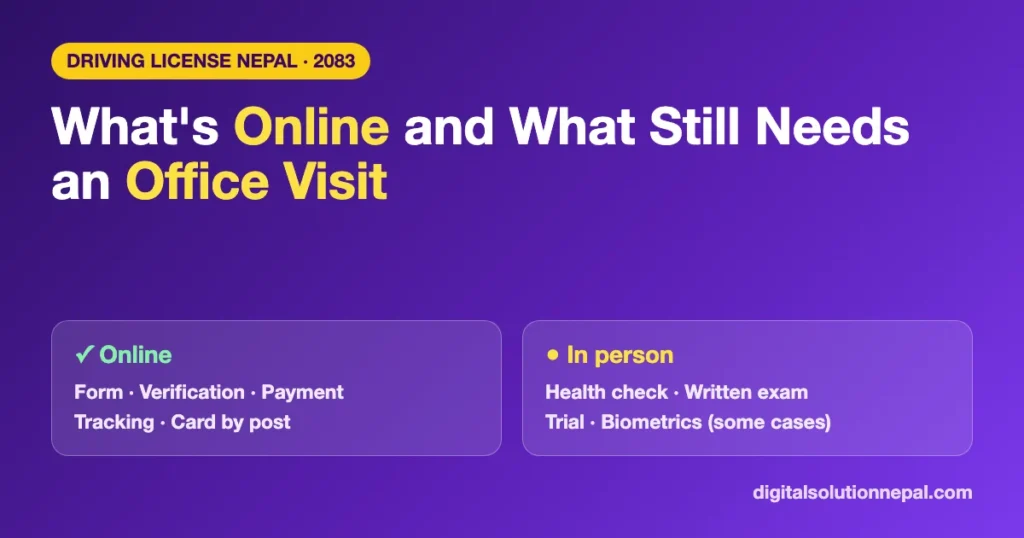
Quick answer: online vs in person
| Step | Online | In person |
|---|---|---|
| Application form (new, category add, renewal, duplicate, retrial) | ✅ | |
| Identity verification with Nagarik App or National ID | ✅ | |
| Choosing a doctor, transport office and exam date | ✅ | |
| Fee and revenue payment | ✅ | |
| Correction request, viewing licence details, tracking print status | ✅ | |
| Receiving the smart card (postal delivery, where available) | ✅ | |
| Health examination | ✅ at the doctor | |
| Written exam, trial and retrial | ✅ at the exam centre | |
| Biometrics when National ID data is not available | ✅ at the office | |
| Foreign nationals and diplomatic staff | ✅ at the office | |
| Document problems, or cases needing a traffic police clearance report | ✅ at the office |
What you can now do online
The system is called EDLVRS (Electronic Driving License and Vehicle Registration System). According to the Department, it has been running through provincial transport offices since Shrawan 2083, and the directive approved on 31 Bhadra gives it a clear legal footing.
- Fill the form for every main service: new licence, category add, renewal, duplicate copy and retrial.
- Skip the typing. Because the system is linked to the Nagarik App and the National ID system, your personal details are filled in automatically. The Department expects this to reduce typing mistakes.
- Pay online. Application fees, exam fees and renewal revenue can be paid through a digital wallet or bank.
- Request corrections if your licence has a factual error.
- View your licence details and track which stage your card printing has reached.
To start, open the Department’s main portal at edlvrs.dotm.gov.np and choose your province. The full list of the eight official portals is in our EDLVRS Directive 2083 guide.
What still needs you in person
1. Health examination
You choose a doctor inside the system, but you must go to that doctor yourself. The doctor then uploads the result directly to EDLVRS.
According to the Department, more than 1,144 listed doctors registered with the Nepal Medical Council or the Nepal Ayurveda Medical Council are in the system so far. Two provinces work differently for now, Techpana reports: Bagamati uses doctors listed by its ministry following a Supreme Court order, and Koshi continues with its earlier method under provincial law.
2. Written exam and trial
For a new licence or a category add, you sit the written exam and the trial at the assigned centre. If you fail the trial, the retrial is also in person. Prepare with our written exam guide and trial day checklist.
3. Biometrics, if your National ID data is not found
If the system cannot find your National ID record, you have to give biometrics at the transport office.
This affects people with a recently issued National ID. According to the report, details of National IDs made since Shrawan 2083 have not been syncing into the licence system, so those holders are still going to the office for biometric verification. If your card is new, expect an office visit. See National ID for a driving license.
4. Foreign nationals and diplomatic staff
Foreign citizens and people working at diplomatic missions must attend the office for biometric verification.
5. When the office calls you in
If your documents have a problem or look doubtful, the office can call you for verification by email or SMS. You also need to appear in person where a traffic police clearance report has to be submitted: when renewal is blocked because the licence expired more than five years ago, or when you apply for a copy of a lost licence. Related guides: renewal fines and duplicate licence.
Getting the card at home
You no longer have to collect the printed smart card from the office.
- Under the federal structure, licence printing is now a provincial responsibility.
- Madhesh and Lumbini have signed agreements with the Security Printing Centre and started printing cards. The other provinces are in the same process, Techpana reports.
- On 6 Asoj 2083, DoTM, the Security Printing Centre and the Department of Postal Services signed an understanding to distribute printed cards through the postal network.
- When filling the online form, you can choose normal or express delivery and enter your home address.
Printing has only begun in two provinces, so availability depends on where you applied. More in driving license home delivery and why smart licence printing is delayed.
The process in order
You need two things before you start: a mobile number registered in your own name and your National ID.
- Open edlvrs.dotm.gov.np and choose your province’s portal.
- Choose the service: new licence, category add, renewal or duplicate.
- Scan the QR code with the Nagarik App, or enter your National ID number. Your details fill in automatically.
- Choose the vehicle category (for example A for motorcycle, B for car or jeep).
- Choose a listed doctor near you, contact them and get the health check. (in person)
- Once the result is approved in the system, choose your transport office and exam date.
- Office staff check your documents online. You get an SMS when the application is approved.
- Pay the revenue online.
- Attend the written exam and trial. (in person)
- After passing, the card is printed and sent by post if you chose delivery.
Need help with the online form or an International Driving Permit?
Order online or message us. फारम भर्न वा IDP का लागि सम्पर्क गर्नुहोस्।
Frequently asked questions
Can I get a driving license in Nepal fully online?
No. The form, verification, payment and tracking are online, but the health check, written exam and trial must be done in person.
Do I have to visit the transport office to renew my licence?
Usually only the doctor. Renewal needs a health check from a listed doctor; the rest is online. An office visit is needed if your documents are questioned or the licence expired more than five years ago.
I have a new National ID. Why is the system not verifying me?
According to the report, National IDs issued since Shrawan 2083 have not been syncing into EDLVRS. In that case you verify by biometrics at the transport office.
Will my licence card be delivered to my home?
You can choose normal or express postal delivery in the online form. Card printing under the new arrangement has started in Madhesh and Lumbini, with other provinces to follow.
Sources
- Department of Transport Management: Directive on Delivering Driving License Services through Electronic Means, 2083 (approved 2083/05/31). Full text (PDF)
- Techpana: report on which licence processes are online and which need an office visit, citing the Department. techpana.com
Digital Solution Pvt. Ltd. is an independent publisher, not affiliated with the Department of Transport Management or any transport office. Figures such as the number of listed doctors and the status of provincial printing are as reported and may change.

Rabin Paudel
Rabin Paudel is the Founder of Digital Solution, a Content Creator, and an AI Trainer. He shares practical and easy-to-understand content on Artificial Intelligence, Digital Literacy, Online Services, FinTech, and Technology. His mission is to make technology simple, accessible, and useful for everyone.
View all posts by Rabin Paudel →