
As of 24 October 2026 (7 Kartik 2083). We opened each official portal named below on this date and read the search forms only. We did not enter any passport number or submit any form. Portals change their layout often, so field names may differ slightly when you visit.
A manpower agent hands you a visa copy and says your flight is soon. Before you pay anything more, confirm the visa yourself. This visa check Nepal passport number guide shows how to search the official government portal of the destination country, and covers the four countries most Nepali workers ask us about: Qatar, the UAE, Saudi Arabia and Malaysia.
Each country works differently. Two of them accept a passport number directly. One needs a document number from the visa itself. One gives workers no public passport search at all. We also show what to do when the portal says “no record found”, and how to match the visa against your Nepal labour permit record at the Department of Foreign Employment (DoFE).
Quick answers
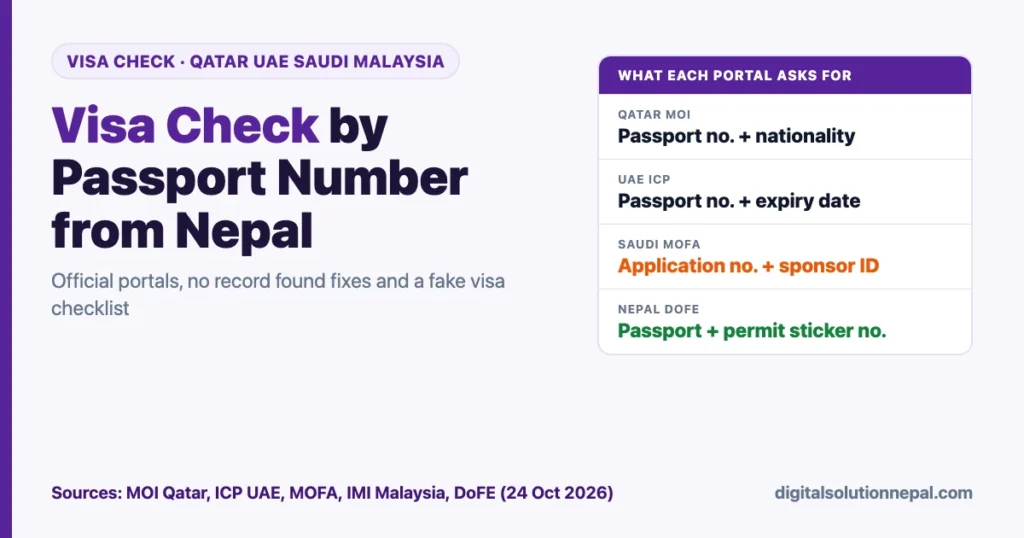
| Country | Official portal | What you type | Passport number alone? |
|---|---|---|---|
| Qatar | Ministry of Interior (MOI) visa inquiry | Passport number + nationality + captcha | Yes |
| UAE | ICP Smart Services, “File Validity” | Passport number + passport expiry date + nationality | Yes, with expiry date |
| Saudi Arabia | MOFA visa platform (visa.mofa.gov.sa) | Application or visa document number + sponsor record number | No |
| Malaysia | MyVISA “Check eVISA Authenticity” | Passport number + visa sticker number | Needs sticker number |
| Nepal (labour permit) | foreignjob.dofe.gov.np | Passport number + labour permit sticker number | Needs sticker number |
Visa check Nepal passport number: what to keep ready
Most failed searches come from small typing errors, not fake visas. Have these in front of you before you open any portal:
- Your passport, to copy the number exactly as printed (letters and digits, no spaces).
- The passport expiry date, needed for the UAE search.
- The visa copy from your agent, which usually shows a visa number, application number or document number.
- Your sponsor or employer ID number, if it is printed on the visa (needed for Saudi Arabia and for one Qatar option).
- For Malaysia, the visa sticker number. For your Nepal labour permit, the permit sticker number.
Use a laptop or phone browser, not a screenshot someone sends you. Type the portal address yourself. Links shared on WhatsApp or Facebook can lead to copycat sites that ask for fees.
Qatar visa check by passport number (MOI)
Qatar’s Ministry of Interior lists a “Visa Inquiry and Printing” service under Inquiries, Visa Services. The MOI page says the service lets you follow up the approval of work or visit visa applications and print or reprint issued visas. The search form itself opens on the MOI payment gateway at fees2.moi.gov.qa.
On our check date the form offered three ways to search: application number, visa number or passport number.
- Go to portal.moi.gov.qa, then Inquiries, Visa Services, Visa Inquiry and Printing. Or open https://fees2.moi.gov.qa/moipay/visa/inquiry?language=en directly.
- Under “Search By”, choose Passport number.
- Type your passport number exactly as printed.
- Choose NEPAL in the Nationality list.
- Type the captcha code shown in the image and press Search.
- If a visa is found, compare the details shown with your visa copy and note the visa number. MOI says the same service can print or reprint issued visas.
If you have the visa number instead, choose “Visa number” and enter it with your nationality. The “Application number” option also asks for the sponsor or representative ID and the application date, so it suits the employer more than the worker.
The Qatar Visa Center (QVC) at qatarvisacenter.com handles appointments for medical tests and biometrics in some countries, and the MOI page links to it for application tracking. When we opened it on 24 October 2026, the page showed a connection error and the tracking screen did not load. Use the MOI inquiry above as your main check.
UAE visa status check by passport (ICP)
The Federal Authority for Identity, Citizenship, Customs and Port Security (ICP) runs a public “File Validity” service on ICP Smart Services. It checks residency and visa files.
- Open https://smartservices.icp.gov.ae and go to the File Validity service (also reachable from Public Services).
- Leave “GCC Citizen” unticked.
- Under “Search By”, choose Passport Information.
- Under “Select the Type”, choose Visa (or Residency if you already hold a UAE residence visa).
- Enter your passport number, passport expiry date and nationality.
- Complete the “Verify” step and press Search.
The result shows whether a valid file exists for that passport. Dubai has its own directorate, the General Directorate of Identity and Foreigners Affairs (GDRFA Dubai) at gdrfad.gov.ae. Our reading: if your visa copy says it was issued in Dubai and ICP returns nothing, check with GDRFA Dubai or ask your employer which authority issued it before you assume it is fake.
ICP lists 600522222 inside the UAE and +971600522222 from outside for enquiries.
Saudi Arabia visa check (MOFA)
The Saudi Ministry of Foreign Affairs visa platform at visa.mofa.gov.sa has a public inquiry box titled, in Arabic, “inquiry about submitted applications”. It does not search by passport number. On our check date it offered three search methods:
| Search method (Arabic label) | English meaning | Where to find it |
|---|---|---|
| رقم الطلب | Application number | Visa application printout |
| رقم مستند التأشيرة | Visa document number | Visa document from the sponsor |
| رقم طلب التأشيرة | Visa application number | Agency or sponsor paperwork |
Every method also asks for رقم السجل (record number). The page’s own field list labels this as the sponsor ID, meaning the Saudi employer’s or sponsor’s registration number.
- Open https://visa.mofa.gov.sa. Click “E” or “English” at the top if you want English labels.
- In the inquiry box, choose the search method that matches the number on your paperwork.
- Enter that number and the sponsor record number.
- Type the image code and press the inquiry button.
If the portal returns “no results found, please check the entered data”, re-check both numbers. If your agent cannot give you an application or document number and a sponsor number, treat that as a warning sign. The MOFA home page also announces a beta of a new “KSA VISA” platform at ksavisa.sa, so the inquiry service may move there later.
Malaysia visa check: eVISA and worker visas
Malaysia’s Immigration Department (Jabatan Imigresen Malaysia) runs MyVISA at malaysiavisa.imi.gov.my. Its “Check eVISA Authenticity” page asks for:
- Passport or document number.
- Sticker number, printed on the eVISA.
- Captcha.
Then press Check. The page is at https://malaysiavisa.imi.gov.my/evisa/check-evisa.
Worker visas follow a different path. The Immigration Department’s foreign worker page says workers enter with a VDR (Visa with Reference) issued by the department and an entry visa from the Malaysian representative office in the home country. After arrival, the worker must pass a FOMEMA medical check within 30 days before the Visit Pass (Temporary Employment), or VP(TE), is issued. That pass is valid for 12 months and the employer applies for each extension.
| Malaysia item | Figure on the Immigration Department page |
|---|---|
| VP(TE) validity | 12 months per pass |
| Visa fee for Nepali workers | RM20 |
| Security bond for Nepali workers | RM750 |
| Medical check after arrival | Within 30 days (FOMEMA) |
The VDR system (eVDR@JIM) is an employer login, and the public SSPI status page is for Malaysian citizens only. Our reading: a Nepali worker has no public passport-only search for a VDR. Ask your agency for the VDR approval letter and confirm it through the agency and the DoFE pre-approval record shown below.
Visa check Nepal passport number shows “no record found”
| What you see | Likely cause | What to do |
|---|---|---|
| No record found on every try | Typing error in passport number | Copy the number from the passport, check O versus 0 and I versus 1 |
| No record found on a new passport | Visa issued on your old passport | Search with the old passport number |
| Qatar search empty, visa copy shows a number | Visa still in process, or issued on another passport | Search by visa number instead |
| UAE File Validity empty | Wrong expiry date, wrong type, or Dubai-issued visa | Re-enter the date, switch Visa or Residency, check GDRFA Dubai |
| Saudi “no results found” | Wrong application or sponsor number | Ask the agency for the exact document and sponsor numbers |
| Malaysia eVISA not found | Wrong sticker number, or it is a worker VDR, not an eVISA | Re-check the sticker; for work, ask for the VDR approval |
| Page will not load or captcha fails | Portal busy or blocking a network | Try later, another browser or another network |
A failed search alone does not prove a visa is fake. A visa that never appears after several careful tries, while the agent keeps asking for money, is a different matter.
Real or fake visa checklist (with your DoFE labour permit)
A genuine work visa is only half of a legal departure. Nepal also requires a final labour permit (श्रम स्वीकृति, labour approval) from DoFE. DoFE’s public notice says the labour permit sticker must be on your passport before you leave for work. Use this checklist:
- Check the visa on the official portal of the destination country, as shown above.
- Check the agency. On foreignjob.dofe.gov.np, open the licensed recruitment agencies list and confirm the manpower company’s name. DoFE warns that consultancies, travel agencies and money changers have no authority to send workers abroad.
- Check the job demand. Use “Search Pre-Permission Detail” on the same site with the Lot number from the job advertisement. DoFE also lets you SMS “LT” followed by a space and the lot number to 34001.
- Match the details. The country, employer and job on the visa should match the pre-approval and your contract. DoFE advises signing only one contract with one company.
- Pay only the agency itself. DoFE asks workers to pay into the agency’s bank account or at its head office, take a receipt, and never pay more than the amount in the pre-approval advertisement.
- Get the labour permit. You pay Rs 1,500 to the Foreign Employment Welfare Fund, as DoFE’s notice states, along with insurance and other steps. Our guide to Shram Swikriti labour approval covers the full process, and our page on foreign employment insurance explains the policy.
- Check the permit. On foreignjob.dofe.gov.np, “Passport Search” asks for your passport number and labour permit sticker number. Your own application status is in FEIMS at feims.dofe.gov.np.
- Do not buy a ticket early. DoFE advises not to buy an air ticket before you have the labour permit, and to fly from a Nepali airport.
Red flags include a visa that never appears on the official portal, an agent who will not give you visa or application numbers, a request to fly through India or another country, and payment demanded into a personal account. Our article on online job scam warning signs lists more patterns.
DoFE publishes toll-free numbers for fraud complaints: 1660-01-09999 (DoFE) and 1660-01-50005 (Foreign Employment Board).
Want us to check your visa and labour permit?
Bring your passport and visa copy to Digital Solution and we will run the official visa check, match it with the DoFE pre-approval and guide your labour permit steps. विदेश जानु अघि भिसा र श्रम स्वीकृति जाँच गराउनुहोस्।
Frequently asked questions
Can I check a visa by passport number only?
For Qatar, yes: the MOI inquiry accepts passport number and nationality. For the UAE you also need the passport expiry date. Saudi Arabia needs an application or visa document number plus the sponsor number. Malaysia’s eVISA check needs the sticker number.
Is the visa check free?
None of the inquiry pages we opened asked for payment to search. If a website asks for a fee just to check a visa, it is probably not the official portal.
My visa shows on the portal. Is it safe to go?
A visa record proves the visa exists. It does not prove the job, salary or agency are genuine. Complete the DoFE checks in the checklist above and get your labour permit before you travel.
The portal says no record found. Is my visa fake?
Not always. Typing errors, a new passport, a visa still in process or the wrong search type are common causes. Work through the troubleshooting table. If nothing works after several careful tries, ask the agency for written details and contact DoFE.
Where do I check my Nepal labour permit?
Use “Passport Search” on foreignjob.dofe.gov.np with your passport and sticker numbers, or log in to FEIMS at feims.dofe.gov.np to see your own application.
Conclusion
A visa check Nepal passport number search takes a few minutes on the official portals. Qatar and the UAE accept passport details. Saudi Arabia needs the application and sponsor numbers. Malaysia needs the sticker number, and worker visas are confirmed through the employer and DoFE. Pair every visa check with the DoFE agency, pre-approval and labour permit checks, and do not pay or fly until both sides match.
Sources
- Ministry of Interior Qatar, Visa Services: Visa Inquiry and Printing (opened 24 October 2026): https://portal.moi.gov.qa/wps/portal/MOIInternet/services/inquiries/visaservices/visainquiryandprinting
- Ministry of Interior Qatar payment gateway, Visa Inquiry form (opened 24 October 2026): https://fees2.moi.gov.qa/moipay/visa/inquiry?language=en
- Qatar Visa Center (did not load fully on 24 October 2026): https://www.qatarvisacenter.com
- ICP UAE, Smart Services File Validity (opened 24 October 2026): https://smartservices.icp.gov.ae/echannels/web/client/default.html#/fileValidity
- GDRFA Dubai home page (opened 24 October 2026): https://gdrfad.gov.ae/en
- Ministry of Foreign Affairs Saudi Arabia, Visa platform inquiry (opened 24 October 2026): https://visa.mofa.gov.sa
- Immigration Department of Malaysia, MyVISA Check eVISA Authenticity (opened 24 October 2026): https://malaysiavisa.imi.gov.my/evisa/check-evisa
- Immigration Department of Malaysia, Foreign Worker page (opened 24 October 2026): https://www.imi.gov.my/index.php/en/main-services/foreign-worker/
- Immigration Department of Malaysia, eVDR@JIM (opened 24 October 2026): https://imigresen-online.imi.gov.my/evdr/main
- Department of Foreign Employment, Foreign Job Search (opened 24 October 2026): https://foreignjob.dofe.gov.np
- Department of Foreign Employment, FEIMS login (opened 24 October 2026): https://feims.dofe.gov.np
- Department of Foreign Employment, public important information notice (checked 20 October 2026): https://dofe.gov.np/pages/public-important/
Disclaimer: This guide explains public government portals for general information; Digital Solution is not affiliated with any of these governments, and you should confirm visa and labour permit details with the issuing authority and DoFE.

Rabin Paudel
Rabin Paudel is the Founder of Digital Solution, a Content Creator, and an AI Trainer. He shares practical and easy-to-understand content on Artificial Intelligence, Digital Literacy, Online Services, FinTech, and Technology. His mission is to make technology simple, accessible, and useful for everyone.
View all posts by Rabin Paudel →