
As of 24 October 2026 (7 Kartik 2083). The steps are from Nepal Telecom spokesperson Kamal Lamichhane as reported by TechPana on 3 Kartik 2083, checked against the live portal on 24 October. Wi-Fi 6 prices and offer dates are from Nepal Telecom’s own FTTH tariff page. The Rs 4,999 plan is from Nepal Telecom’s press release as reported by several outlets; it was not yet listed on the tariff page when we checked.
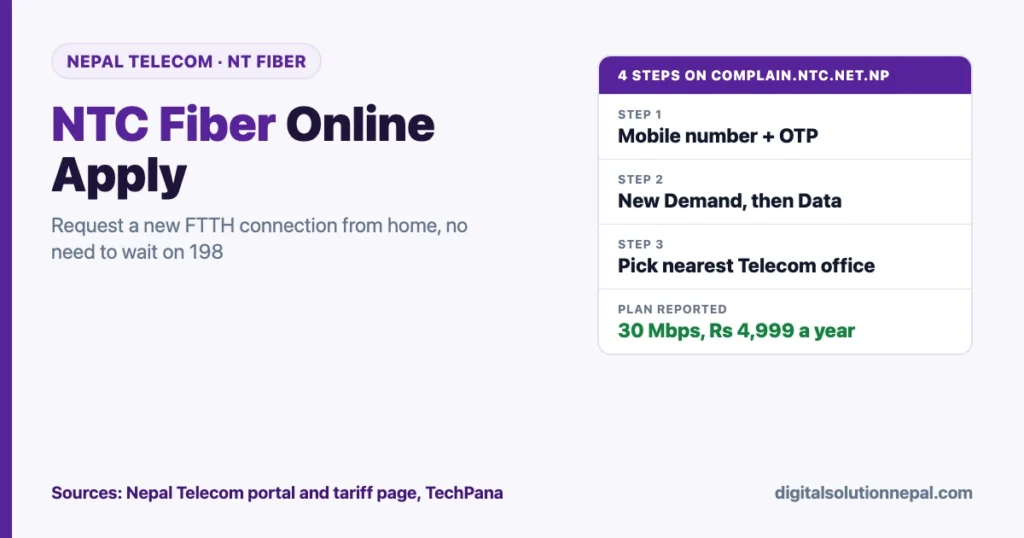
If you tried to call 198 for a new Nepal Telecom fiber connection this month, you probably heard a busy tone or a dropped call. Nepal Telecom has now opened an online route. The NTC fiber online apply process takes about two minutes: verify your mobile number with an OTP, choose New Demand, choose Data, pick your nearest Telecom office and submit. The office then calls you.
This guide shows each step, what the portal looks like, which plans you can ask for, and what to do if the call never comes.
Quick answers
| Question | Answer |
|---|---|
| Where to apply online | complain.ntc.net.np (Nepal Telecom Customer Complain Portal) |
| Login | Your mobile number plus a 6-digit OTP sent by SMS |
| Menu to choose | New Demand, then Data |
| What happens next | The selected Telecom office calls you, explains the package and sends an installation team |
| Phone alternative | 198 for NT Fiber, 1498 for Namaste Mobile |
| Cheapest yearly plan reported | 30 Mbps for Rs 4,999 a year |
| Offer window | 30 Asoj to 30 Kartik 2083 (16 October to mid-November 2026) |
Why Nepal Telecom opened online requests
In mid-October, Nepal Telecom announced new yearly NT Fiber plans, including a 30 Mbps plan for Rs 4,999. Private ISPs had raised prices and dropped cheap low-speed plans around the same time, as we covered in our internet price hike report. Demand for the Rs 4,999 plan jumped, and the 198 hotline could not keep up.
TechPana reported that people waited for long periods, got cut off, or had calls time out. Former Finance Minister Rameshwor Khanal also complained publicly that his own FTTH line was down for three days and 198 kept dropping his calls. Nepal Telecom’s answer was to let new customers leave their details online so the local office can call them back.
According to spokesperson Kamal Lamichhane, customers who submit their details online get a call from the office. The office explains the package and sends a team for installation.
Need help with your NTC fiber request?
Digital Solution helps you fill the Nepal Telecom request, pick the right plan and set up Wi-Fi at home or office. Message us on WhatsApp.
NTC fiber online apply: step by step
You only need a phone that can receive SMS. A Nepal Telecom number is not required by the portal text, but use a number you will answer, because the office calls it.
- Open the portal. Go to
https://complain.ntc.net.np/in any browser. The page title is “Customer Complain Portal”. You can switch to Nepali with the नेपाली button at the top. - Enter your mobile number. Type your 10-digit number after the +977 box, for example 98XXXXXXXX.
- Tap Send OTP. A 6-digit code arrives by SMS.
- Enter the OTP. Your dashboard opens.
- Choose New Demand. This is the option for new services, separate from complaints.
- Choose Data. Data means internet (FTTH fiber). Do not choose a voice option unless you also want a landline.
- Select the nearest Telecom office. Pick the office that serves your ward or tole, not the biggest office in your district. A wrong office means delay.
- Fill the remaining details. Enter your name, address and other fields the form asks for. Give a clear landmark (school, temple, chowk) so the survey team can find you.
- Submit. Wait for the office to call you.
Tips that save a second visit
- Write your address the way a technician would search for it: municipality, ward number, tole name and a landmark.
- Mention the plan you want in any notes field, for example “30 Mbps yearly Rs 4,999” or “100 Mbps Wi-Fi 6”.
- Keep your citizenship or national ID card and a passport-size photo ready. The portal does not list documents, but Nepal Telecom usually completes customer forms at installation.
- If you live in a rented flat, ask the house owner beforehand whether fiber can be pulled to your floor.
What the portal looks like
When we opened the portal on 24 October 2026 it showed version v0.1.0.17-beta. The first screen has one heading, “Verify your number”, one mobile number box with a +977 prefix, and a Send OTP button.
Below the button, Nepal Telecom says that if the SMS does not arrive or your mobile network is unavailable, you can register over the phone instead: 1498 for Namaste Mobile and 198 for NT Fiber. So the online system is an addition to 198, not a replacement.
The same portal is used to register and track complaints. Existing customers with a fault can use it too, which is often faster than waiting on the hotline.
Which NT Fiber plan to ask for
The Rs 4,999 30 Mbps yearly plan
Nepal Telecom’s press release, as reported by Nepalitelecom, Radio Nepal, Ratopati and ICT Frame, introduced a 30 Mbps plan for Rs 4,999 a year from 30 Asoj 2083 (16 October 2026). Reports say it was earlier a student-only plan and is now open to everyone, and that the Rs 500 installation fee is waived. TechPana reports the offer runs until 30 Kartik.
When we checked Nepal Telecom’s FTTH tariff page on 24 October, this 30 Mbps plan was not yet listed there. Confirm the price on the call before you pay.
Wi-Fi 6 festive offer (confirmed on Nepal Telecom’s tariff page)
| Speed | Normal yearly price | Festive offer price | Mobile data bonus per day |
|---|---|---|---|
| 100 Mbps | Rs 14,499 | Rs 11,499 | 400 MB + 400 MB (11 PM to 6 AM) |
| 150 Mbps | Rs 15,999 | Rs 12,999 | 450 MB + 450 MB (11 PM to 6 AM) |
| 200 Mbps | Rs 19,499 | Rs 16,499 | 500 MB + 500 MB (11 PM to 6 AM) |
These are Wi-Fi 6 “Internet and Telephone” packages. Nepal Telecom lists prices as inclusive of all taxes and says the offer is valid from 2083/06/30 to 2083/07/30 for 12 months of service.
Regular yearly and two-year plans
The same tariff page lists standard yearly plans such as 50 Mbps at Rs 8,499 and 100 Mbps at Rs 11,499, and two-year plans from Rs 14,999 for 50 Mbps. Two-year plans have no installation charge, while a single-year plan normally has a Rs 500 installation charge. For the full list, see our NTC fiber price list.
Which one should you pick?
| Your use | Suggested plan |
|---|---|
| One or two people, browsing, YouTube, online classes | 30 Mbps for Rs 4,999 |
| Family of four, several phones, a smart TV | 100 Mbps Wi-Fi 6 festive offer |
| Work from home, video calls, large uploads | 150 Mbps or 200 Mbps |
| You will stay at the same address for two years | A two-year plan, to skip the installation charge |
After you submit: what to expect
- A call from the office. The office you selected calls to confirm your address and the plan.
- Feasibility check. Fiber must reach your area. If the nearest distribution point is far, the office may say the service is not yet available at your location.
- Payment. Pay as the office instructs, at the office or through the Nepal Telecom app. Ask for the exact total, including any ownership tax for bundled TV plans.
- Installation. A team pulls the cable and installs the router (CPE). Nepal Telecom’s tariff page says CPE and up to 100 m of fiber cable are free on its regular packages.
TechPana did not give a fixed installation time, and demand is high right now. Expect it to take longer than usual in busy areas like Kathmandu valley, Pokhara and Butwal.
If nobody calls you
- Wait two to three working days, then log in to the portal again and check your request.
- Call 198 at off-peak times, early morning or after 8 PM, and mention that you already applied online.
- Visit the Telecom office you selected with your citizenship or NID card. Ask for the FTTH desk.
- Do not pay agents. Nepal Telecom does not need a middleman for a new connection. Be careful with Facebook pages that promise “fast installation” for an extra fee.
- Do not share your OTP with anyone who calls you. The OTP is only for you to log in.
Frequently asked questions
How can I apply for NTC fiber online?
Open complain.ntc.net.np, verify your mobile number with the 6-digit OTP, choose New Demand, then Data, select your nearest Telecom office, fill in your details and submit. The office calls you to confirm the package and arrange installation.
Is the Rs 4,999 NTC fiber plan available for everyone?
Reports of Nepal Telecom’s press release say the 30 Mbps yearly plan, earlier limited to students, is now open to all users, with the installation fee waived. It was not yet on Nepal Telecom’s tariff page on 24 October 2026, so confirm when the office calls.
Why is 198 not connecting?
The 198 line is overloaded because of the new yearly plans. Nepal Telecom launched online requests on its Customer Complain Portal so new customers do not have to wait on the phone. You can still call 198, ideally at off-peak hours.
Until when is the NTC fiber offer valid?
Nepal Telecom’s tariff page lists the Wi-Fi 6 festive offer from 2083/06/30 to 2083/07/30. TechPana reports the 30 Mbps offer also runs until 30 Kartik. The plan you buy is valid for 12 months from activation.
Can existing NTC fiber customers use the portal?
Yes, for complaints and tracking. The portal is Nepal Telecom’s Customer Complain Portal, so existing customers can register faults there. Whether existing customers can switch to the Rs 4,999 plan has not been stated; ask your Telecom office.
Conclusion
The NTC fiber online apply route is the quickest way to get in the queue during this offer: OTP login, New Demand, Data, nearest office, submit. Use a phone number you will answer, write a clear address with a landmark, and confirm the final price on the call.
Need help choosing a plan, filling the form, or setting up Wi-Fi in your home or office? Digital Solution can help you with the request and the router setup.
Sources
- Nepal Telecom Customer Complain Portal (checked 24 October 2026)
- Nepal Telecom FTTH tariff (Wi-Fi 6 festive offer, regular plans)
- TechPana: Telecom online internet connection request process (3 Kartik 2083)
- Nepalitelecom: Nepal Telecom brings Rs 4,999 yearly internet pack
- Ratopati: Telecom’s fiber internet for Rs 4,999

Rabin Paudel
Rabin Paudel is the Founder of Digital Solution, a Content Creator, and an AI Trainer. He shares practical and easy-to-understand content on Artificial Intelligence, Digital Literacy, Online Services, FinTech, and Technology. His mission is to make technology simple, accessible, and useful for everyone.
View all posts by Rabin Paudel →