
As of 27 October 2026 (10 Kartik 2083). Photo rules are from the DV-2026 instructions published in the Federal Register on 1 October 2024 (the last full instructions issued), the State Department’s photo pages on travel.state.gov as archived in July 2026, and the final DV rule in force since 10 April 2026. The live travel.state.gov and dvprogram.state.gov sites blocked our automated check, so confirm on dvprogram.state.gov before you submit. DV-2027 instructions may change these details.
The EDV photo requirements are where many Nepali entries quietly fail. The form itself takes about an hour, but a photo with the wrong background, a pair of glasses or last year’s file can make an entry ineligible even if every other field is correct. The State Department checks photos before selection, and it does not tell you that your photo was the problem.
Below: one checklist of the official rules, what to tell a photo studio in Nepal, free ways to check pixel and file size, and photos for children.
Fill your EDV form with Digital Solution
- We fill your EDV entry on the official site, dvprogram.state.gov, once the entry period opens, with you present or on a call.
- Correct 600 x 600 photos for you, your spouse and every child, plus a clean passport scan in the required format.
- We help you pay the US$1 government fee. Our service charge is separate and we tell you the amount before we start.
- You get the confirmation number and a printed confirmation page on the spot, and the entry uses your own email.
- We never promise selection. The lottery is random, and only Entrant Status Check gives results.
Quick answers
| Question | Answer (DV-2026 instructions) |
|---|---|
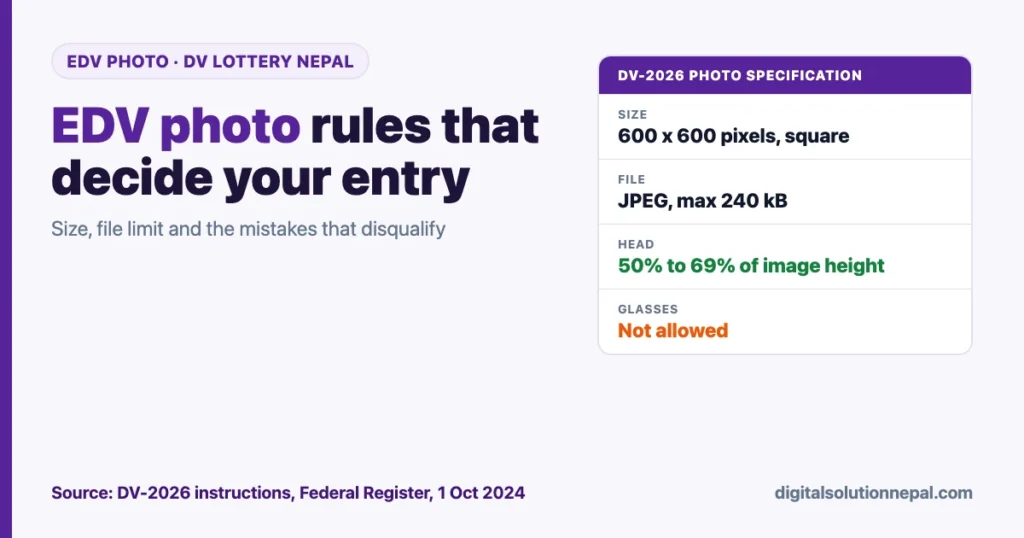
| Pixel size | Exactly 600 x 600 pixels, square |
| File type | JPEG (.jpg) |
| Maximum file size | 240 kB |
| Background | Plain white or off-white |
| How recent | Taken within the last 6 months |
| Glasses | Not allowed |
| Head size | 50% to 69% of image height, chin to top of hair |
| Who needs a photo | You, your spouse and every unmarried child under 21 |
| Same photo as last year? | Makes you ineligible |
Where the form stands on 28 October
A US court ordered the State Department to open DV-2027 registration by 1 November 2026, and the US government has appealed and asked for a pause. So the opening is not certain. Our EDV form 2027 court order explainer tracks the case, and our EDV 2028 opening date guide covers the US$1 fee and the new passport rule.
The State Department has not published DV-2027 instructions as of our check. The photo rules below come from the DV-2026 instructions, which match the general US visa photo pages.
EDV photo requirements: the full checklist
Use this as a final check before you upload.
| Requirement | Official rule | Source |
|---|---|---|
| Dimensions | 600 x 600 pixels, square (height equals width) | DV-2026 instructions |
| Format | JPEG (.jpg) | DV-2026 instructions |
| File size | Equal to or less than 240 kB | DV-2026 instructions |
| Colour depth | Colour, 24 bits per pixel, sRGB colour space | Digital Image Requirements page |
| Compression | Compression ratio of 20:1 or less | Digital Image Requirements page |
| Head size | 50% to 69% of total image height, bottom of chin to top of head including hair | DV-2026 instructions |
| Eye height | 56% to 69% of image height, measured from the bottom of the image | Photo Composition Template |
| Recency | Taken within the last 6 months | DV-2026 instructions |
| Background | Plain white or off-white | DV-2026 instructions |
| Pose | Full face, directly facing the camera, neutral expression, both eyes open | DV-2026 instructions |
| Focus | In focus | DV-2026 instructions |
| Glasses | Not worn | DV-2026 instructions |
| Head covering | Not allowed unless worn daily for religious reasons; full face visible, no shadow on face | DV-2026 instructions |
| Clothing | Normal daily clothes; no uniform except daily religious clothing | DV-2026 instructions |
| Headphones, earbuds | Not allowed (hearing aids are fine) | DV-2026 instructions |
| Editing | Must not be manipulated or digitally altered | DV-2026 instructions |
| Scanned print | 2 x 2 inches (51 x 51 mm) original, scanned at 300 pixels per inch | DV-2026 instructions |
For a 600-pixel image, the head should measure between 300 and 414 pixels from chin to top of hair, and the eyes should sit between 336 and 414 pixels up from the bottom edge (our calculation from the official percentages).
One detail confuses people. The general Digital Image Requirements page allows images up to 1,200 x 1,200 pixels for visa applications. The DV entry rule is narrower: 600 x 600 pixels. Use 600 x 600 for the EDV form.
What the State Department says can make you ineligible
The DV-2026 instructions are direct about photos. You “may be ineligible” if the photos for you or your family do not fully meet the specifications or have been manipulated in any way. Submitting the same photo used in a prior year’s entry will make you ineligible.
This is not checked only at interview. In its March 2026 rule, the Department said it already runs checks before selection to detect duplicate entries and photos that do not meet the required standards. A successful upload and a confirmation number do not prove your photo passed.
What to tell the photo studio in Nepal
Most studios in Kathmandu, Pokhara and other cities know “DV photo” or “American visa photo”. Many still produce a print first and a file second, so be specific. Say or show this list:
- “I need a digital file for the US DV lottery: JPEG, exactly 600 x 600 pixels, under 240 kB.”
- “Plain white or off-white background. No grey, no blue, no pattern, no shadow behind me.”
- “No glasses. I will remove them.”
- “Face straight to the camera, neutral expression, both eyes open.”
- “No beauty filter, skin smoothing, background cut-out or face editing.” The rules ban digital changes to your appearance.
- “Head from chin to top of hair should fill 50 to 69 percent of the height. Do not crop the top of my hair.”
- “Even light on both sides of my face, no flash glare.”
- “Please send the file on WhatsApp as a document, or copy it to my pen drive.” Sending as a normal WhatsApp photo can recompress and resize the image.
Ask the studio to take a fresh photo even if you had one taken for a passport or another visa recently. A new photo avoids any chance of reusing last year’s DV file. If you also want prints for a possible interview later, ask for 2 x 2 inch (51 x 51 mm) prints on photo paper; DV selectees bring two identical photos to the interview.
How to check pixel size and file size for free
Check the file yourself before the form opens. The DV entry form has a 60-minute limit under the DV-2026 instructions, so fixing a photo mid-way is risky.
On a Windows computer
- Right-click the photo and choose Properties.
- On the General tab, read “Size”. It should be 240 KB or less.
- On the Details tab, read Dimensions (should say 600 x 600) and Bit depth (should say 24).
- If it is larger, open it in Paint, choose Resize, select Pixels, set 600 by 600 (crop it to a square first so the face is not stretched), and save as JPEG.
On a Mac
- Open the photo in Preview.
- Choose Tools, then Show Inspector, to see the pixel dimensions.
- Choose Tools, then Adjust Size, to set 600 x 600 pixels.
- Use File, then Export, choose JPEG, and lower the quality slider if the file is over 240 kB. Finder’s Get Info shows the final size.
On an Android phone or iPhone
Open the photo in your gallery app and tap the info (i) button or swipe up. Most gallery apps show the resolution and file size there. If the photo shows something like 3000 x 4000, it is a camera original and needs cropping.
iPhones often save photos as HEIC, not JPEG. The EDV form needs a .jpg file, so convert it or ask the studio for JPEG. Free phone editors can crop to a square, but avoid any app that smooths skin or changes the background automatically.
The State Department’s free photo tool
The State Department offers a free photo tool at tsg.phototool.state.gov. It lets you select a photo from your computer, resize and rotate it, crop it to exactly 600 x 600 pixels, and save it. The Department says the tool is for cropping only and does not check photo quality. A State Department employee makes the final decision.
Do not over-compress
Squeezing a photo down to a tiny file can make it blurry. The Digital Image Requirements page sets a maximum compression ratio of 20:1. For a 600 x 600 colour image, that works out to a file of roughly 54 kB or more (our calculation: 600 x 600 pixels x 3 bytes = 1,080,000 bytes, divided by 20). A file between about 60 kB and 230 kB is a comfortable target (our reading, leaving a margin below the 240 kB limit).
Common EDV photo mistakes Nepalis make
The State Department’s photo examples group rejected photos into these areas: shadows and lighting, size and position, resolution and quality, digital changes, pose and expression, attire, hats and glasses, background, and children. In practice, these are the mistakes we see most often:
| Mistake | Why it fails |
|---|---|
| Reusing last year’s DV photo | Same photo as a prior entry makes you ineligible |
| Wearing glasses | Glasses are not allowed in new visa photos since 1 November 2016 |
| Grey, blue or patterned background | Must be plain white or off-white |
| Shadow on the wall or face | Listed as a common rejection category |
| Beauty mode, filters or edited background | Photos must not be digitally altered |
| Head too small or top of hair cut off | Head must be 50% to 69% of height |
| Photo cropped from passport or citizenship card | Photos copied or scanned from official documents are not accepted |
| Selfie or casual phone snapshot | Snapshots and low quality mobile phone photos are not accepted |
| Smiling broadly or eyes half closed | Neutral expression with both eyes open |
| Cap, dhaka topi or hat worn for style | Head coverings only if worn daily for religious reasons |
| Earbuds or headphones in the frame | Not allowed |
| File over 240 kB or not square | Fails the technical specification |
| Photo older than 6 months | Must reflect current appearance |
On the dhaka topi: the rule allows a head covering only when it is worn daily for a religious purpose. A topi worn as cultural or formal dress does not clearly fit that, so remove it (our reading of the rule).
Photos for children and babies
Every unmarried child under 21 listed on the entry needs a separate photo meeting the same specifications. The DV-2026 instructions say you must list all such children, including adopted children and stepchildren, even if they will not immigrate. You do not need a photo for a spouse or child who is already a US citizen or green card holder.
For babies and toddlers, the State Department gives these rules:
- The child must be the only person in the photo. A parent’s hands or arms holding the child must not appear.
- The child’s eyes must be open and looking at the camera.
- Tip 1: lay the baby on its back on a plain white or off-white sheet. Watch for shadows when shooting from above.
- Tip 2: cover a car seat with a plain white or off-white sheet and photograph the child in it.
For a child under 16 whose appearance changes through normal growth, the Department says a new photo is generally not needed later. For the entry itself, the 6-month rule still applies to every family member.
The passport scan is a separate upload
Since the rule effective 10 April 2026, the entry also needs a scan of your passport’s biographic and signature page. That scan follows different rules: JPEG only, no PDF, and not more than 5 MB. Do not crop the photo from the passport page and use it as your entry photo. If your passport is near expiry, our passport renewal guide covers the process.
Want us to fill your EDV form?
Digital Solution fills your EDV entry on the official site with correct photos for every family member, the passport scan and the US$1 payment, and hands you the confirmation number. Our service charge is told upfront. EDV फारम भर्न WhatsApp गर्नुहोस्।
Frequently asked questions
What are the EDV photo requirements for 2026?
Under the DV-2026 instructions, the photo must be a colour JPEG of exactly 600 x 600 pixels and no more than 240 kB, taken within the last 6 months, on a plain white or off-white background, with no glasses. The head must fill 50% to 69% of the image height.
Can I take my EDV photo with a mobile phone?
The State Department recommends a professional photo service and says low quality mobile phone photos and snapshots are not acceptable. A good studio photo is the safer choice. If you crop a file yourself, check that it is sharp, evenly lit and meets every specification.
Can I use the same photo as last year?
No. The DV-2026 instructions say that submitting the same photograph used in a prior year’s entry will make you ineligible. Take a new photo for each entry.
Can I wear glasses or a dhaka topi in the photo?
Glasses are not allowed. The general visa photo page allows a rare medical exception with a signed medical statement, but the DV-2026 instructions simply say not to wear eyeglasses. Hats and head coverings are allowed only when worn daily for religious reasons, with the full face visible.
Does my spouse need a photo even if they will not go to the US?
Yes, if your spouse is not a US citizen or green card holder, you must list them with a photo meeting the same specifications. The same applies to every unmarried child under 21.
What size photo do I need if I am selected?
At the immigrant visa interview, each DV applicant brings two identical printed photos, 2 x 2 inches (51 x 51 mm), on photo quality paper.
Conclusion
The EDV photo requirements are strict but simple: a fresh colour JPEG, exactly 600 x 600 pixels, under 240 kB, white or off-white background, no glasses, head 50% to 69% of the height. Get a new photo for every family member, check the size yourself with the free tools above, and keep the files ready before the form opens. Then submit only on dvprogram.state.gov, and check the new instructions there for any change.
Sources
- Federal Register (via GovInfo), Diversity Visa Instructions for DV-2026, Public Notice 12558 (1 October 2024): https://www.govinfo.gov/content/pkg/FR-2024-10-01/html/2024-22482.htm
- Federal Register, Diversity Visa Instructions for DV-2026 (1 October 2024): https://www.federalregister.gov/documents/2024/10/01/2024-22482/diversity-visa-instructions-for-dv-2026
- Federal Register (via GovInfo), Visas: Enhancing Vetting and Combatting Fraud in the Diversity Immigrant Visa Program, final rule (11 March 2026, effective 10 April 2026): https://www.govinfo.gov/content/pkg/FR-2026-03-11/html/2026-04737.htm
- US Department of State, Photo Requirements (archived 9 July 2026): https://travel.state.gov/content/travel/en/us-visas/visa-information-resources/photos.html
- US Department of State, Photo Examples (archived 10 July 2026): https://travel.state.gov/content/travel/en/us-visas/visa-information-resources/photos/photo-examples.html
- US Department of State, Digital Image Requirements (archived 13 July 2026): https://travel.state.gov/content/travel/en/us-visas/visa-information-resources/photos/digital-image-requirements.html
- US Department of State, Photo Composition Template (archived 11 July 2026): https://travel.state.gov/content/travel/en/us-visas/visa-information-resources/photos/photo-composition-template.html
- US Department of State, Photo Frequently Asked Questions (archived 2 July 2026): https://travel.state.gov/content/travel/en/us-visas/visa-information-resources/photos/frequently-asked-questions.html
- US Department of State, Photo Tool: https://tsg.phototool.state.gov/photo
- US Department of State, Electronic Diversity Visa Program (official entry site): https://dvprogram.state.gov/
- CourtListener, Red Eagle Law, LC v. Rubio, No. 26-6943 (9th Cir.), docket read 27 October 2026: https://www.courtlistener.com/docket/74994271/red-eagle-law-lc-v-rubio/
This guide is for information only; the US Department of State decides whether a photo is acceptable, so follow the instructions on dvprogram.state.gov.

Rabin Paudel
Rabin Paudel is the Founder of Digital Solution, a Content Creator, and an AI Trainer. He shares practical and easy-to-understand content on Artificial Intelligence, Digital Literacy, Online Services, FinTech, and Technology. His mission is to make technology simple, accessible, and useful for everyone.
View all posts by Rabin Paudel →